
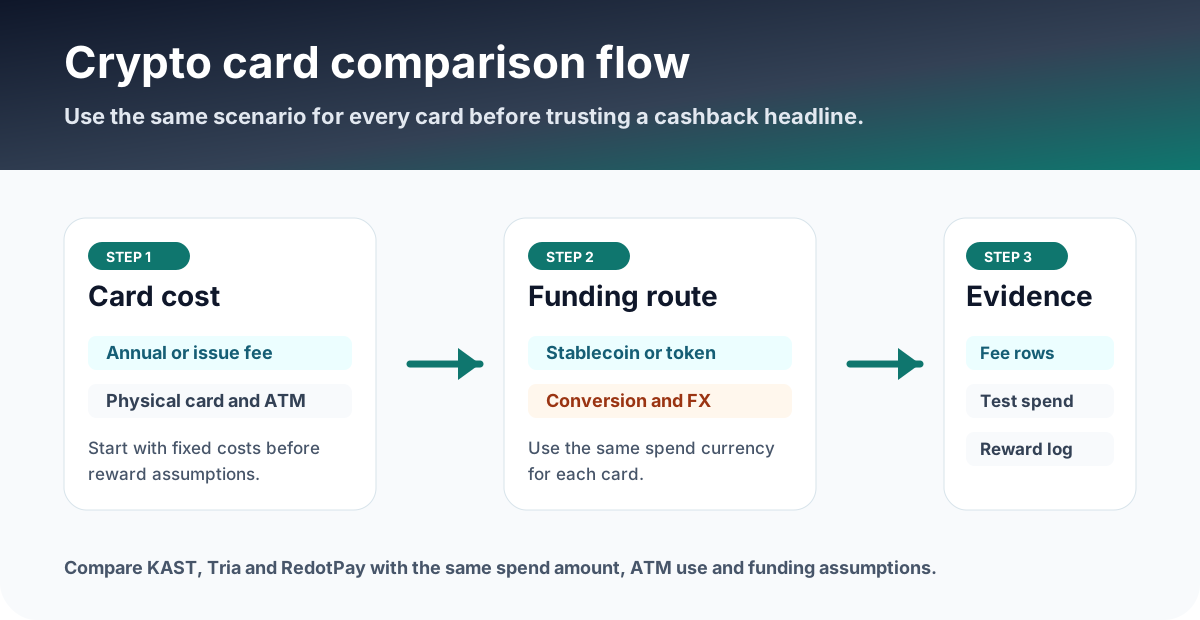
For English readers, MetaMask Card and ether.fi Cash are the strongest additions to the existing KAST and RedotPay research set. Before applying, verify region eligibility, card tier, supported wallet, funding token, FX and ATM fees, and whether the card can be added from the official app flow.
Shortlist: mobile-wallet crypto cards to compare
What to check before adding a crypto card to Apple Pay or Google Pay
Start inside the official app whenever possible. If the issuer provides an Add to Apple Wallet or Add to Google Pay button, use that flow before manually typing card numbers.
Mobile wallet does not remove card fees
Apple Pay and Google Pay are payment rails, not a guarantee of free spending. KAST still requires FX, ATM and deposit conversion checks. RedotPay still requires card fee, crypto conversion, non-card-currency and Pro checks. MetaMask Card still has token, network, ATM and cross-border rows. ether.fi Cash still has FX, ATM, Direct Pay and Borrow Mode mechanics.
| Card | Mobile wallet angle | Main fee/risk check |
|---|---|---|
| KAST | Apple Pay and Google Pay listed with 0% fee on official fee page | Non-USD FX, ATM, tier, small transactions and deposit conversion |
| RedotPay | Apple Pay help flow and Pro cashback angle | Card fee, crypto conversion, other-currency spend, ATM and Pro cap |
| MetaMask Card | Virtual card available via Apple Pay or Google Pay in eligible regions | Supported country, network, token fee, ATM and cross-border fee |
| ether.fi Cash | Apple Pay and Google Pay ready on public Cash page | Direct Pay vs Borrow Mode, FX, ATM, cashback cap and interest |
When adding or paying fails
- Confirm the card is active in the issuer app and not waiting for KYC, upgrade, card creation or identity checks.
- Check whether your country is eligible for signup, not just whether Mastercard or Visa is accepted at the merchant.
- Update the issuer app and phone OS, then use the official add-to-wallet button again.
- Try a small transaction in card currency before testing cross-border, ATM, subscriptions or pre-authorizations.
- Save the exact error message and contact issuer support from the official app or help center.
Pick the right mobile-wallet crypto card
Use mobile wallet support as a filter, then choose based on fees and funding method.
Stablecoin spending, self-custody wallet spending, app-first card, or credit-style vault spending.
Use the issuer app button and save wallet-add success or failure screen.
Model $1,000 spend and one ATM scenario with the exact issuer fee rows.
Evidence to save
- Issuer app Card screen before adding to wallet.
- Apple Wallet or Google Wallet add result screen.
- First small payment with merchant name, currency, amount and card transaction detail.
- Reward or cashback history after settlement, not just pending authorization.
- Error message and support ticket number if wallet add or payment fails.
FAQ
Does Apple Pay support mean the crypto card works everywhere?
No. Merchant acceptance, issuer region, card status, token support, KYC and fee rows still decide whether the card works.
Which card should I try first?
Start with the card whose funding route matches your existing assets. Stablecoin users may compare KAST and RedotPay, while self-custody wallet users may compare MetaMask Card and ether.fi Cash.
Should I use ATM with a mobile-wallet crypto card?
ATM use often has separate fees and may be limited by card tier or region. Check the issuer ATM row and test small only if ATM use is important.
Official sources checked
Card terms, regions, rewards, and fees can change. Use the links below to verify the live issuer pages before applying, funding, or making a large purchase.