
ether.fi Cash is attractive for users who want non-custodial, app-controlled Visa spending and can understand the difference between Direct Pay and Borrow Mode. The key risk is treating a credit product like a simple debit card; Borrow Mode can start interest immediately, refunds do not automatically reduce the borrow balance, and FX or ATM fees still matter.
What ether.fi Cash is
ether.fi calls Cash a crypto-native credit card. The official FAQ says it is included with ether.fi Club membership, starts with a virtual card after KYC, and is intended to work where Visa cards are accepted.
The product page promotes up to 3% cashback, Apple Pay and Google Pay readiness, virtual and physical cards, non-custodial account controls, and spend with value-accruing stables. The help center is where the real decision happens because it explains Direct Pay, Borrow Mode, FX, ATM fees and limits.
Official app screens to check before using Cash
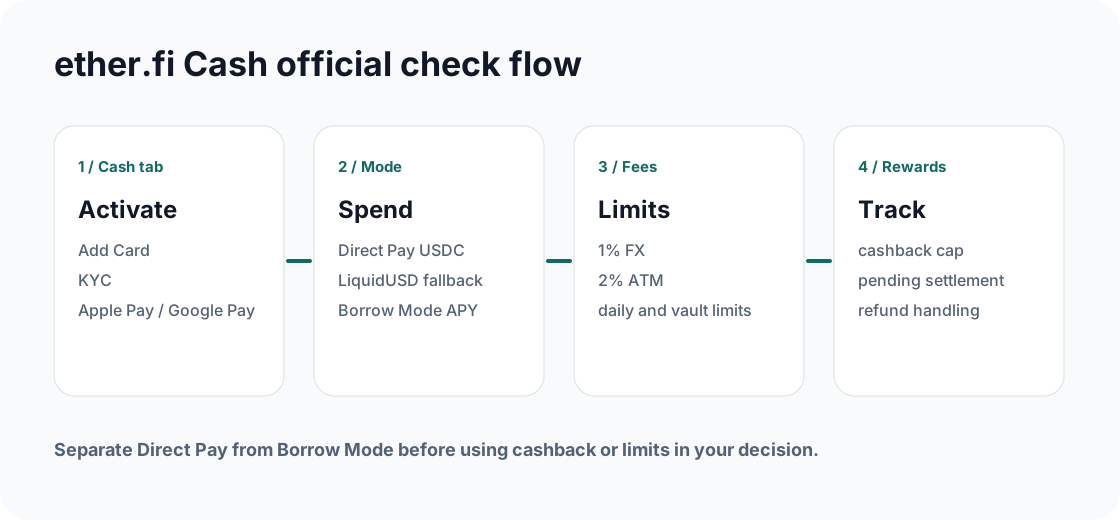
ether.fi Cash has more moving parts than a simple top-up card. Check the Cash tab, Vault, spend limits, Direct Pay or Borrow Mode, and cashback screen before the first purchase.
Fees and limits that affect real value
The personal Cash help page lists Core spending at $30,000/day, Luxe at $50,000/day and Pinnacle at $100,000/day. ATM withdrawals are listed as 250 USD with up to three attempts in a rolling 24-hour period for Core, Luxe and Pinnacle, with a 2% ATM fee. The FX fee is listed as 1% across tiers, and the card is currently USD-based with native euro support planned.
| Check | Official row to verify | Why it matters |
|---|---|---|
| FX | 1% across tiers | Applies when settlement is outside supported currency assumptions. |
| ATM | 250 USD and 2% fee per withdrawal for Core/Luxe/Pinnacle rows | ATM attempts count even if declined, and local operators can add fees. |
| Card currency | USD-based currently, native euro support planned | Important for non-USD users and refund comparisons. |
| Spend mode | Direct Pay or Borrow Mode | Borrow Mode can create interest immediately. |
Cashback: read the cap and exclusions
The public Cash page presents 3% cashback across Cash card levels and tier caps such as up to $2,000/month for Core, $10,000/month for Luxe and $50,000/month for Pinnacle.
The legal cashback terms are stricter: eligible personal purchases can earn a range of cashback rewards, the maximum cashback rewards are limited to $1,000 per month, and excluded transactions include ATM withdrawals, peer-to-peer payments, tax payments, gift cards, money orders and cash equivalents.
Do not model cashback from headline rates alone. Use the Cash screen to verify your tier, monthly cap, legal cap, eligible purchases, payout asset, and whether a transaction is pending or fully processed.
Direct Pay vs Borrow Mode
Direct Pay uses eligible vault assets directly. The help center states USDC is used first and LiquidUSD second, while other assets are not eligible for Direct Pay at the checked date. Borrow Mode lets you spend using vault assets as collateral; borrowed amounts begin accruing interest immediately with no grace period, and the stated APY is 4%.
If you want to avoid borrowing fees, keep enough eligible USDC or LiquidUSD in the vault and confirm Direct Pay before tapping.
If a refund arrives, it is credited to the vault balance and does not automatically reduce the borrow balance. Repayment must be handled separately.
Complete the ether.fi Cash decision
Confirm the mode first, then model fees and rewards.
Add Card, KYC, virtual card status and Apple Pay or Google Pay readiness should be checked in the app.
For daily spending, verify eligible Direct Pay assets. For Borrow Mode, watch collateral, LTV, interest and repayment.
Confirm FX, reward tracking, settlement, refund behavior and transaction history before large spend.
Evidence to save
- Cash tab screenshot showing card status, tier and Card Settings.
- Vault screen showing Direct Pay assets or Borrow Mode collateral and borrow balance.
- Fee and limit rows for FX, ATM, spending limits and card currency.
- Cashback screen showing monthly cap, earned rewards, pending status and payout asset.
- Refund or repayment history if Borrow Mode is used.
Official sources, reader evidence, and small tests
Before acting on a card page, check the issuer app or official help page, then keep records that can be matched to dates, fees, card status, rewards, and region eligibility.
FAQ
Is ether.fi Cash a debit card?
ether.fi describes Cash as a crypto-native credit card. Direct Pay can feel debit-like, but Borrow Mode introduces collateral and interest mechanics.
What is the FX fee?
The official help center says ether.fi applies a 1% FX fee on Cash transactions in currencies other than USD or EUR, with Visa conversion applied at settlement.
Does every purchase earn cashback?
No. The cashback terms list excluded transactions, including ATM withdrawals, peer-to-peer payments, tax payments, gift cards, money orders and cash equivalents.
Official sources checked
Card terms, regions, rewards, and fees can change. Use the links below to verify the live issuer pages before applying, funding, or making a large purchase.