
The best crypto card depends on your funding asset and spending currency. KAST is the cleanest stablecoin-to-USD cashback candidate, Tria is the broad wallet-spending candidate, and RedotPay is the app-first stablecoin card candidate.
How to compare the cards without getting misled
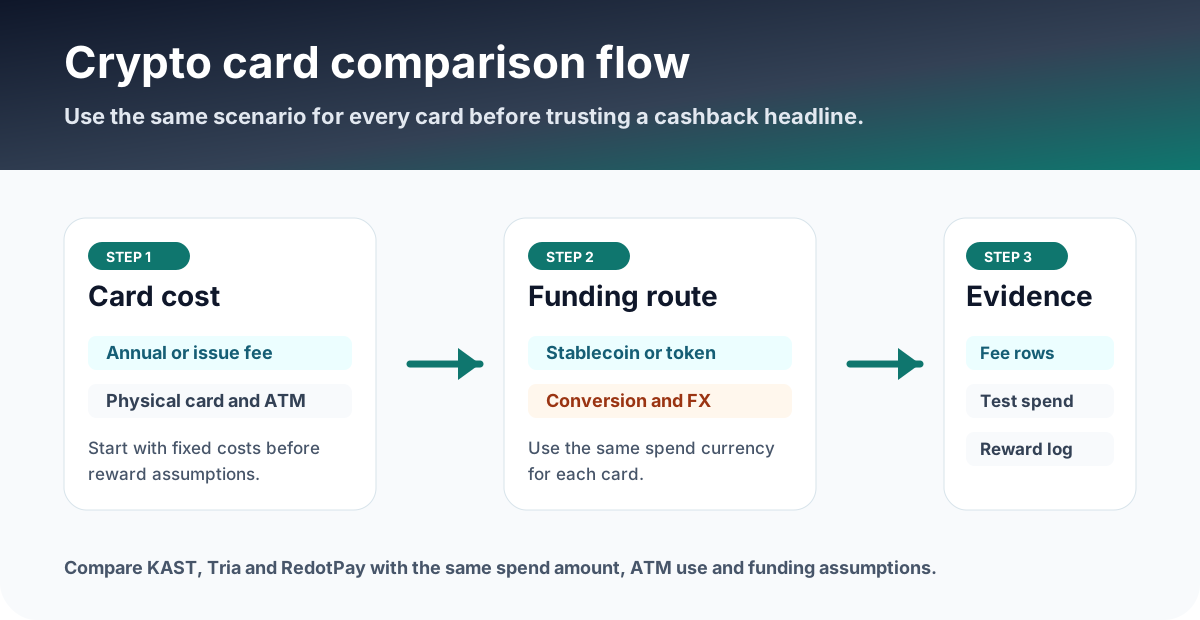
Start from the official screen that controls money: card tier, fee table, deposit asset, spend currency, and reward history. Marketing pages are useful, but they are not enough.
Pick by use case, not by headline reward
Best when you deposit supported stablecoins, avoid unnecessary conversion, and value USD cashback.
Best when you want broad token support and are willing to verify tier conditions in-app.
Best when you want a straightforward payment app and can model conversion, card, ATM, and Pro costs.
$1,000 monthly spend example
For English readers, a single scenario makes the comparison more useful than generic pros and cons. Assume $1,000 of monthly non-USD card spend.
KAST may have 0.5-1.75% FX before cashback. RedotPay may combine conversion and other-currency fees depending on funding and card currency. Tria may show zero deposit and FX claims in help content, but the live app should still be checked for tier cost, conversion, and regional availability.
| Check | KAST Card | Tria Card | RedotPay |
|---|---|---|---|
| Core angle | Stablecoin-to-USD card account with tiered cards. | Self-custody wallet spending with broad token support. | Stablecoin payment app with virtual and physical card options. |
| Cost headline | Standard $0 annual fee; Premium $1,000/year; Private $10,000/year. | Tier and availability must be checked in the app; help center lists Virtual, Signature, Premium tiers. | Virtual/physical card fees plus optional RedotPay Pro membership. |
| Rewards | USD cashback: 1.5%, 2%, or 3% depending on tier; higher tiers add KAST Points. | Help center table shows 1.5%, 4.5%, and 6% cashback by tier. | RedotPay Pro shows 3% Apple Pay and Google Pay cashback up to a monthly cap. |
| Fees to watch | Non-USD FX 0.5-1.75%; non-stablecoin auto-conversion 2-5%; ATM $3 + 2%. | Confirm card tier, regional availability, Earn withdrawal route, and membership cost in the app. | Crypto conversion 1%; non-card-currency transaction 1.2%; ATM 2% or 3% depending on card and monthly amount. |
| Best fit | Stablecoin users who want transparent USD cashback. | Users who want broad token support and wallet-based spending. | Users who prefer an app-first card with clear conversion and Pro perks. |
What to do before applying
- Open the official site from the card hub.
- Check the live fee table, card tier, region support, KYC, card issuance cost, and limits.
- Run a small transaction first.
- Save screenshots of fee rows, transaction history, cashback or rewards, and withdrawal history.
Choose one card with the same three-step test
This keeps the comparison practical and prevents a high reward headline from hiding an expensive funding route.
If you mainly hold USDT or USDC, KAST or RedotPay is easier to model. If you want broader wallet spending, inspect Tria.
For non-USD or non-card-currency spend, include FX and transaction fees before cashback.
Only use the official link after the app confirms region, KYC, tier, fee, and reward status.
What to save before and after using the card
- The fee table rows used for each card in the comparison.
- Card tier or Pro membership screen if a paid plan is part of the decision.
- Small test deposit and first card transaction history.
- Cashback, points, Earn, or Pro benefit history after the transaction settles.
FAQ
What should I verify before applying, funding, or spending?
Open the official site or app and confirm the supported region, card availability, fee rows, reward terms, funding method, and any deadline shown on the account screen. If the condition is unclear, pause before applying or funding and compare the app display with the official help page.
Which records should I keep after using the card?
Keep the official page screenshot, application or KYC status, funding transaction, card statement, fee row, cashback or points entry, timestamp, currency, amount, and any TXID or statement number. Store them by month so support checks and later tax review are easier.
What should I trust if the app and this page differ?
Before applying, funding, or spending, use the latest official site or in-app screen as the source of truth. Treat this page as a decision checklist and save the live fee, reward, and availability screens.
Official sources checked
Terms change quickly. Use this page to narrow your choice, then confirm the final fee table, card availability, limits, and campaign terms in the official app or help center.
Official social and update checks
Check official social accounts for campaign changes, app incidents, region changes, maintenance notices, and posts that are newer than help-center articles.