
RedotPay is easiest to understand as an app-first stablecoin card. In June 2026, the important checks are no longer only card issuance and ATM fees: confirm RLUSD deposit, Spend and withdrawal screens separately, then check whether XRP support applies to Card, Credit, transfer, or wallet use in your account.
RedotPay screens to check before applying
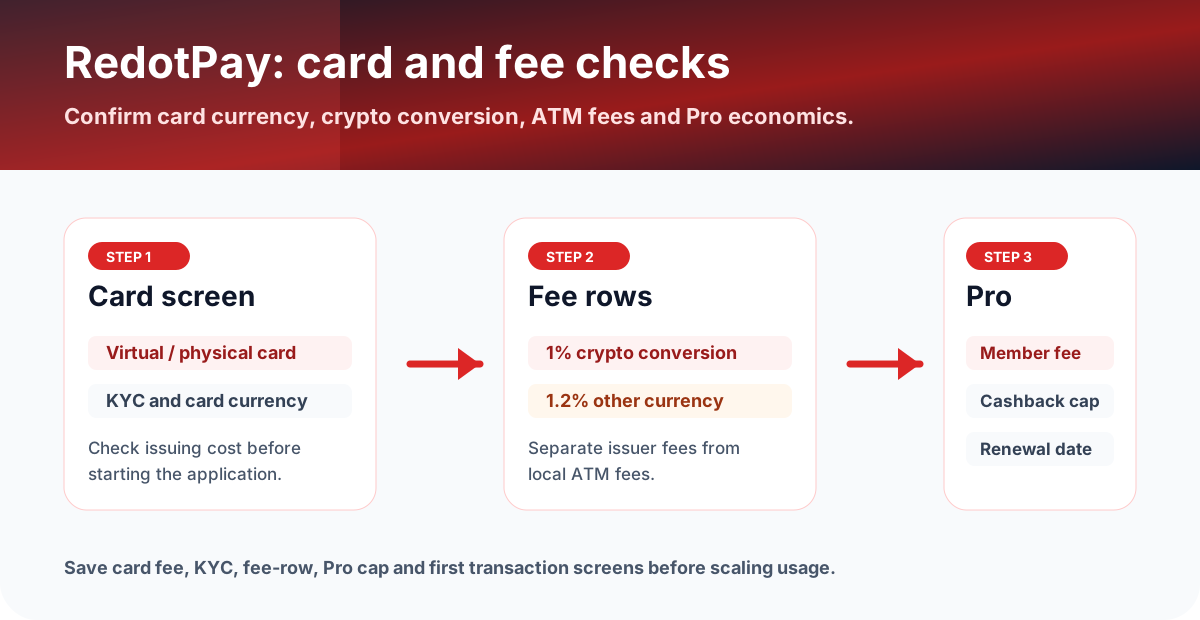
RedotPay decisions should start from the Card screen, then move to the fee help pages and Pro page. The important question is whether your real currency, card currency, and crypto funding route trigger extra cost.
What is RedotPay?
RedotPay describes itself as a stablecoin-based payment app with virtual and physical cards, an all-in-one wallet, instant spending, and support for assets such as BTC, ETH, BNB, SOL, TON, TRX, XRP, USDT, and USDC.
For readers, the main task is not just creating the card. It is checking the exact conversion, asset, network, withdrawal and transaction fee rows before using the card for a large purchase.
June 2026 asset checks: RLUSD and XRP
RedotPay's official RLUSD help page says RLUSD deposit and Spend opened on June 2, 2026 at 4:00 PM UTC+8, while withdrawal is scheduled to open on June 9, 2026 at 4:00 PM UTC+8. Treat those as three different app checks: Deposit, Spend and Withdraw can show different availability, networks, limits or status messages.
RedotPay's XRP update is broader than a simple card-spend headline. It mentions XRP use with RedotPay Credit, card spending, transfers such as XRP to NGN, and Multi-Currency Wallet conversion. If you only care about the card, open the Card and transaction screen first; if you care about credit or remittance, check those product screens separately before funding.
Fees to check
RedotPay's help center lists crypto conversion at 1%, transactions in card currency at no fee, and transactions in other currencies at 1.2%. ATM fee rows differ by HKD or USD card and monthly withdrawal amount.
| Fee row | Published value to verify | Why it matters |
|---|---|---|
| Crypto conversion | 1% | Affects funding and spending from crypto balances. |
| Other-currency transaction | 1.2% | Important when merchant currency differs from card currency. |
| ATM | 2% for HKD card; USD card 2% or 3% based on monthly amount | Local ATM operators may add separate fees. |
| RedotPay Pro | $12.90/month or $129/year | Only worth considering if Pro benefits offset the membership fee. |
RedotPay Pro: when does it make sense?
RedotPay Pro lists a free virtual card waiver on monthly membership, a free physical card waiver on annual membership, 3% cashback on Apple Pay and Google Pay purchases up to a monthly cap, ATM fee waivers for annual members, and boosted Earn rewards in supported regions.
The clean way to evaluate it is to calculate monthly Apple Pay or Google Pay spend that qualifies for cashback, subtract the membership cost, and ignore benefits you will not actually use. For the dedicated membership math, use the RedotPay Pro fee and cashback guide.
$1,000 spend and Pro sanity check
If your funding route also requires crypto conversion, model that separately instead of treating the purchase as fee-free.
Pro only makes sense if the card waiver, Apple Pay or Google Pay cashback, ATM waivers, or Earn boost are actually used.
App checklist before applying
- Open Card and confirm virtual or physical card cost.
- Check KYC status and country support.
- Check whether your currency and crypto asset will trigger conversion or non-card-currency fees.
- For RLUSD, check Deposit, Spend and Withdraw separately, then save the network and fee screen.
- For XRP, separate card spending from Credit, transfer and wallet-conversion flows.
- If considering Pro, check used credit, remaining limit, cashback cap and membership renewal date.
What to save before and after using the card
- Card screen showing virtual or physical card, fee, card currency, and KYC status.
- Deposit, Spend and Withdraw screens for RLUSD, including network, fee, minimum and TXID after a test.
- XRP screen used for the actual flow: Card, Credit, Send, Wallet, or transfer route.
- Fee row screenshots for crypto conversion, other-currency transactions, and ATM withdrawals.
- RedotPay Pro screen showing membership cost, cashback cap, renewal date, and used credit.
- Transaction history after a small card purchase and any ATM test.
FAQ
What changed for RedotPay in June 2026?
RedotPay's official help center says RLUSD deposit and Spend opened on June 2, 2026 at 4:00 PM UTC+8, with withdrawal scheduled for June 9, 2026 at 4:00 PM UTC+8. XRP also appears in RedotPay's broader Credit, transfer and wallet content, so check the exact app flow you plan to use.
What should I verify before applying, funding, or spending?
Open the official site or app and confirm the supported region, card availability, fee rows, reward terms, funding method, deposit and withdrawal asset support, and any deadline shown on the account screen. If the condition is unclear, pause before applying or funding and compare the app display with the official help page.
Which records should I keep after using the card?
Keep the official page screenshot, application or KYC status, funding transaction, card statement, fee row, cashback or points entry, timestamp, currency, amount, network, asset, and any TXID or statement number. Store them by month so support checks and later tax review are easier.
What should I trust if the app and this page differ?
Before applying, funding, or spending, use the latest official site or in-app screen as the source of truth. Treat this page as a decision checklist and save the live fee, reward, and availability screens.
Official sources checked
Terms change quickly. Use this page to narrow your choice, then confirm the final fee table, card availability, limits, and campaign terms in the official app or help center.
Official social and update checks
Check official social accounts for campaign changes, app incidents, region changes, maintenance notices, and posts that are newer than help-center articles.